
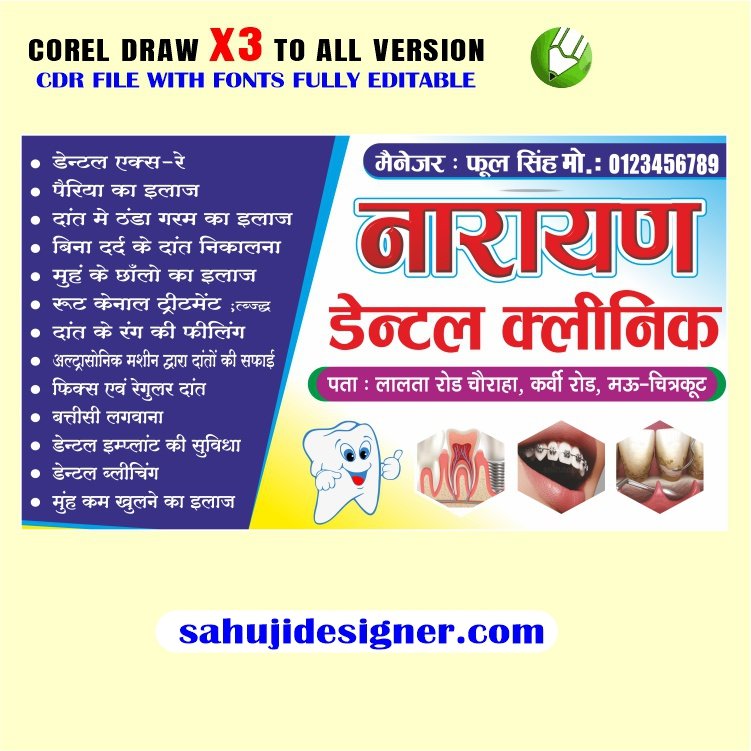

Dental Clinic Banner CDR File
Thank you for reading this post, don’t forget to subscribe!
- Clean and Modern: Use a minimalist design with a calming color palette (blues, greens, whites). Feature a simple image of a healthy smile or a modern tooth icon.
- Warm and Inviting: Employ warm colors like oranges, yellows, and creams to create a friendly atmosphere. Include images of happy people or a family-friendly scene.
- Professional and Trustworthy: Use darker blues or greens with sophisticated fonts. Highlight your clinic’s specialties (e.g., cosmetic dentistry, implants).
- Focus on a Specific Service: If you’re promoting a special offer (e.g., teeth whitening), dedicate the banner to that service.
Text Suggestions:
- Headline: “Healthy Smiles Start Here,” “Your Smile, Our Priority,” “[Clinic Name] – Expert Dental Care,” “Smile Brighter with [Clinic Name]”
- Sub-headline: (Optional) “Family Dentistry,” “Cosmetic Dentistry Specialists,” “Implants & Restorative Dentistry,” “[Special Offer Details]”
- Call to Action: “Call Now for an Appointment,” “Book Your Consultation Today,” “Visit Our Website,” “[Phone Number]”
To create your banner in CorelDRAW:
- Open CorelDRAW: Launch the software.
- Create a New Document: Select the appropriate size for your banner.
- Add Images: Insert relevant images (photos or icons). Ensure you have the rights to use any images you find online.
- Add Text: Use different font sizes and styles for headlines and subheadings.
- Choose Colors: Select a color palette that matches your brand and design style.
- Arrange Elements: Position the text and images carefully for maximum impact and readability.
- Save as CDR: Save your design as a CDR file for future edits. You can also export it to other formats (JPG, PNG) if needed.
Remember to make the banner visually appealing, easy to read, and relevant to your target audience. Good luck!


Reviews
There are no reviews yet.